More about HKUST
Course Registration
Course Selection & Registration
FAQ for UG Students - Validation
01 Aug 2021
UG
1. What is validation?
Validation is a process, which starts a few days before the enrollment period, for students to do their course planning. Students can check their pre-enrollment result and plan for taking additional elective courses. Students can use the “validate” button in the shopping cart to check their eligibility to enroll in courses they choose. In some cases, prior approvals are required before enrollment in the courses and students may make use of the validation period to seek relevant approvals.
2. How should I do my course planning?
You should do your course planning based on your program curriculum and own interests. Here are a few useful websites:
-
Curriculum (Graduation Requirement)
-
Course Catalog
When in doubt, you are encouraged to seek academic advice from your School’s advising office or your major department.
3. Do I need to put the pre-enrolled classes into the shopping cart for validation?
No, pre-enrolled classes are confirmed enrollment and do not require further validation.
4. How to access “Plan” and “Enroll” functions from the Student Center?
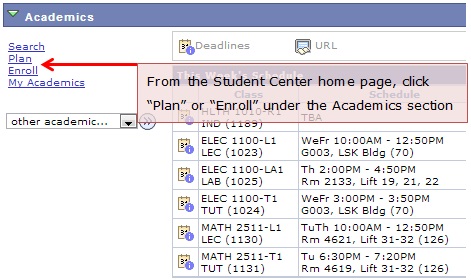
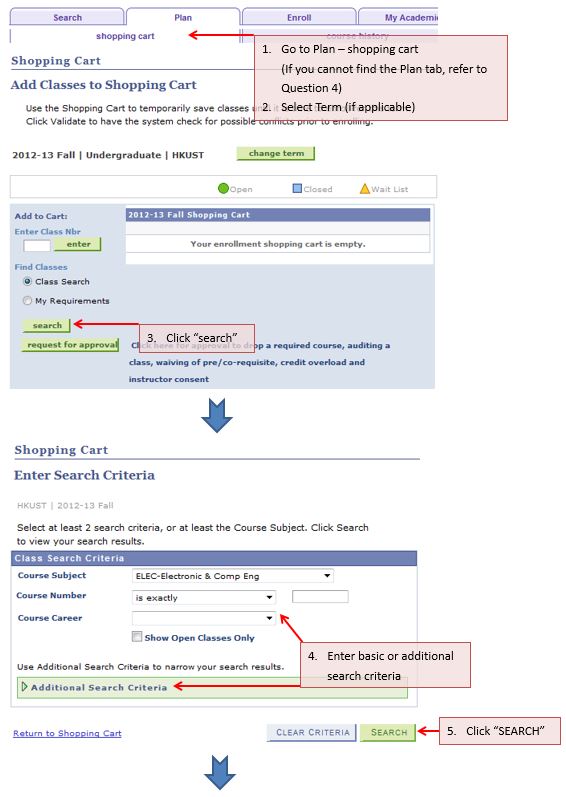
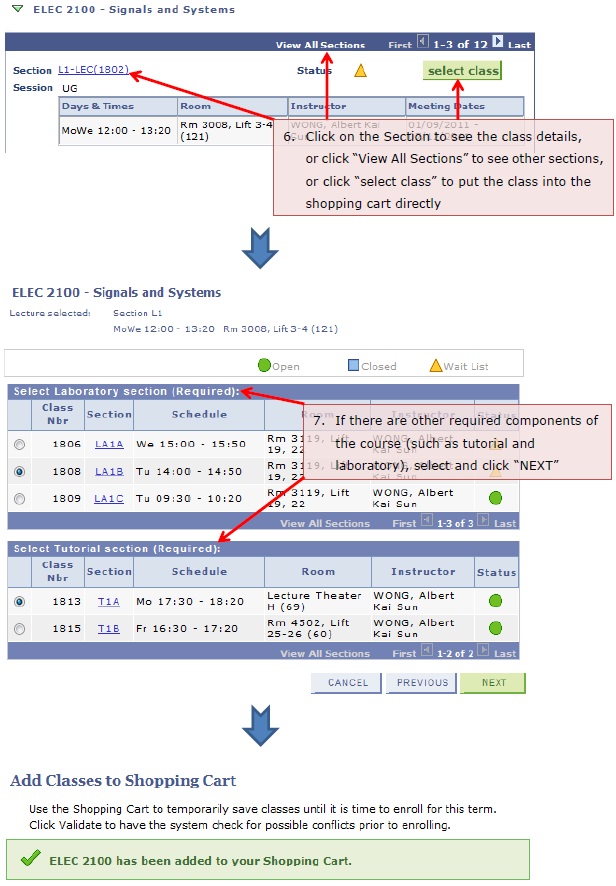
5. How to select classes and put them into the shopping cart?
6. How to perform validation and how to solve validation errors?
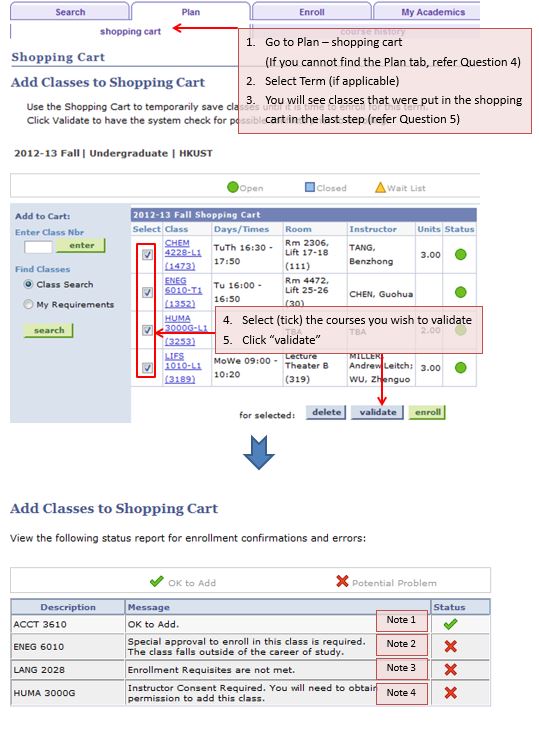
Possible outcomes of the validation report:
|
Note |
What is the meaning? |
How do I solve the problem? |
|
Note 1 |
You may add this course during the enrollment period. |
Note that validation does not mean the seat is “reserved” for you. Remember to enroll in the course(s) during the enrollment period. |
|
Note 2 |
It is a warning message if a UG student tries to validate a PG course, or vice versa. |
Seek “cross career” approval. |
|
Note 3 |
Student does not meet the enrollment requisite, which may include pre-/co-requisites or other conditions (e.g. only for a particular Major). |
Seek “requisite waiver” approval. Note: This error message can also be triggered by course exclusion which cannot be waived according to university regulations. |
|
Note 4 |
Permission from the instructor is required to enroll in this class. |
Seek “instructor’s consent” approval. |
To learn how to request for approval, refer to Question 7.
7. How to request for approval and what should I do after that?

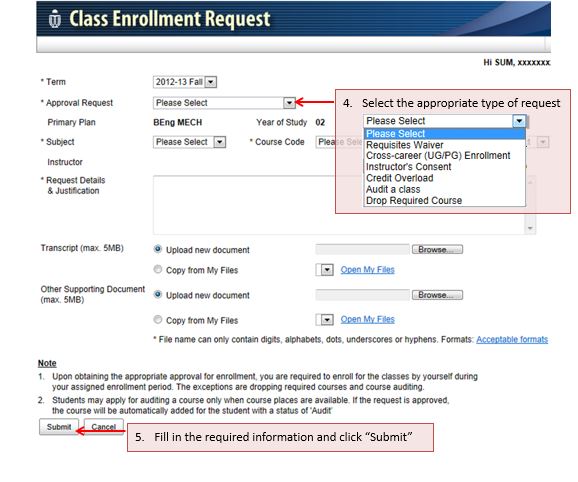
8. How to check the assigned credit load of my current term?
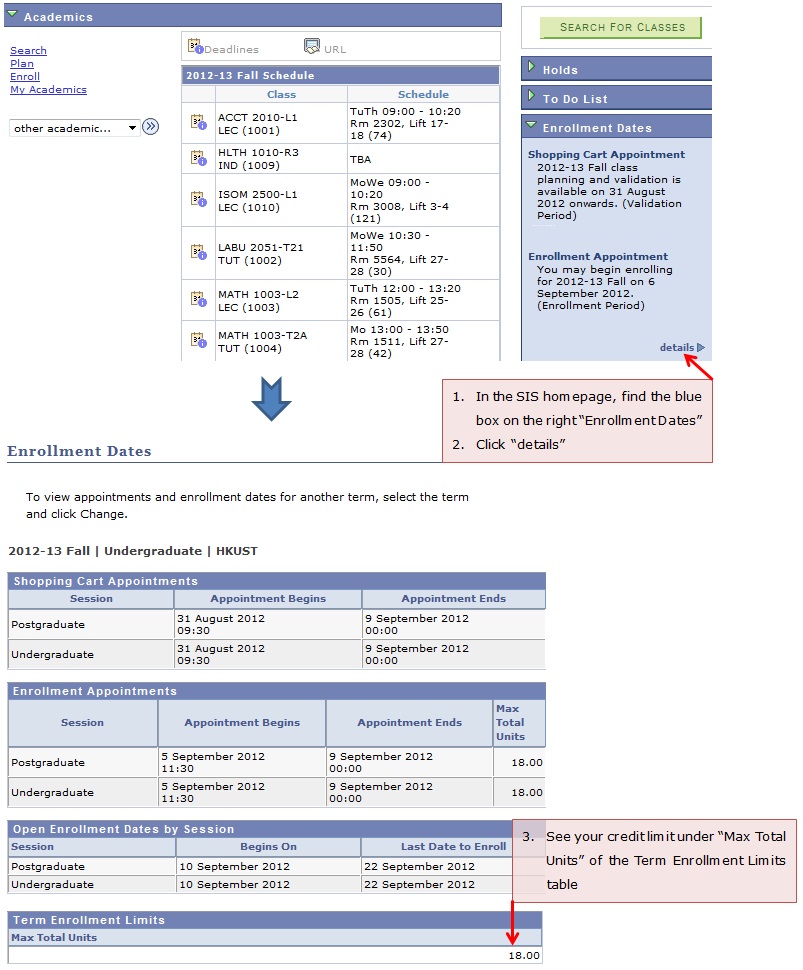
9. When can I request for course approvals?
Approval requests can be submitted from the start of the validation period until the add/drop deadline.
10. What should I do after obtaining the course approvals?
Students should perform validation again to ensure the results show “OK to add” without other errors. During the enrollment period, students should go to the SIS to confirm their enrollment. Please note that approval does not guarantee available seats.
11. Will I be notified when a decision is made?
If the instructor has made a decision (approval or rejection) on your approval request, notification will be sent to your email immediately. If the instructor approves your requisite waiver, cross career or consent request, you may enroll in the course during the enrollment period. If the instructor approves your drop or audit request, the drop/audit action will be performed by the system immediately.